

Local Pipeline Validation
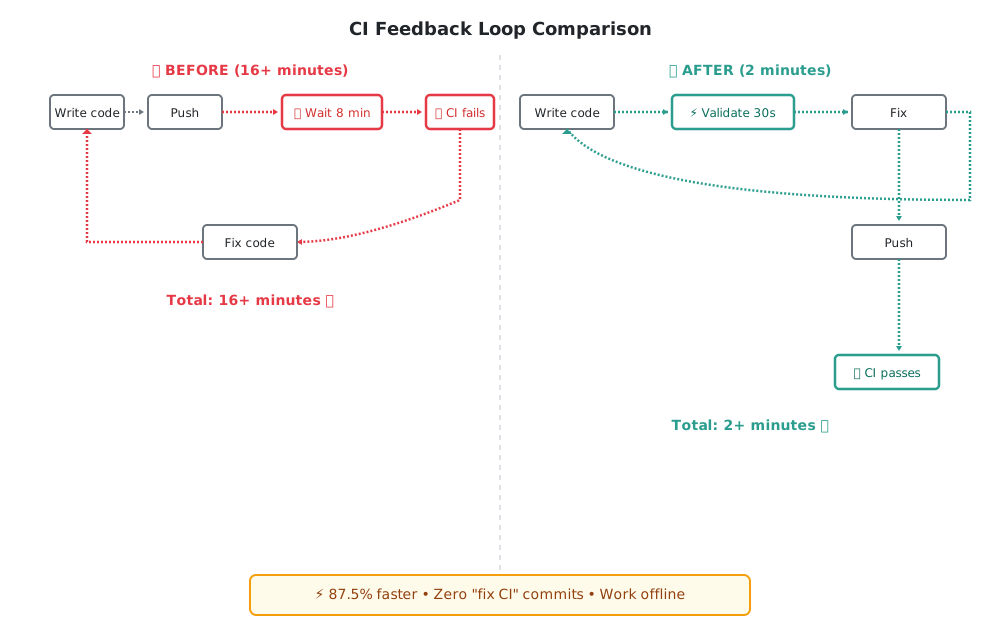
Waiting 8 minutes for CI to tell you there’s a syntax error in your workflow file is soul-crushing. Then you fix it, push again, wait another 8 minutes—and discover you forgot to set an environment variable. Two “fix CI” commits later, you’ve lost 20 minutes and your flow state is destroyed.
There’s a better way: validate your pipelines locally in 30 seconds before you push.
Why Validate Locally?
Local validation transforms your CI/CD workflow from reactive to proactive:
- Instant feedback: Get results in 30 seconds instead of waiting 5-10 minutes for CI
- Prevent “fix CI” commits: Catch errors before they pollute your git history
- Work offline: Develop and test without network dependency
- Save CI minutes: Reduce cloud CI usage by 60-70% for workflow development
- Maintain flow: Stay focused instead of context-switching while waiting for CI
Developers who validate locally report catching 60-70% of pipeline failures before they ever hit CI, dramatically reducing the feedback loop and maintaining productivity.
Quick Start: GitHub Actions with act
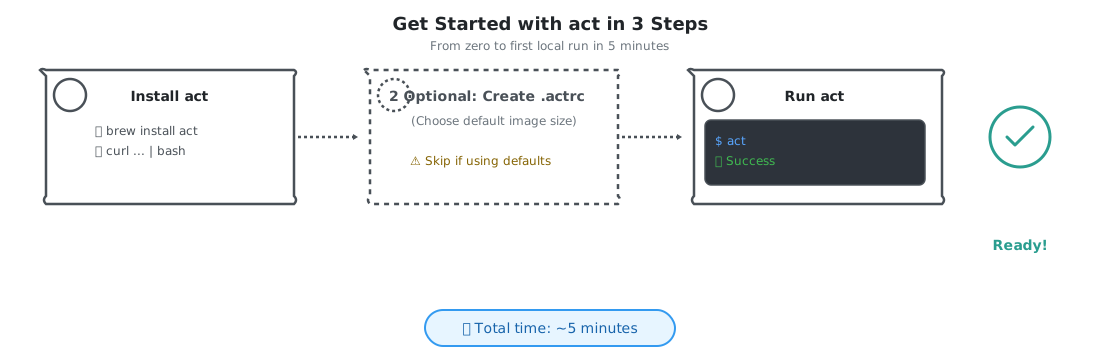
act lets you run GitHub Actions workflows locally using Docker. Most developers are up and running in under 5 minutes.
Installation
Choose your platform:
brew install actcurl https://raw.githubusercontent.com/nektos/act/master/install.sh | sudo bash# Using Chocolatey
choco install act-cli
# Or using Scoop
scoop install actPrerequisites: Docker must be installed and running. act uses Docker to run your workflows in containers that simulate GitHub’s runners.
Basic Usage
Once installed, navigate to your repository and run:
# Run all workflows triggered by push event
act

# Run workflows for a specific event
act push
act pull_request

# List all available jobs without running them
act -l
Your first run will ask you to choose a Docker image size. For most projects, “Medium” (Ubuntu 20.04) works well. This choice is saved in ~/.actrc for future runs.
Example output:
[Build/build] 🚀  Start image=catthehacker/ubuntu:act-20.04
[Build/build]   🐳  docker pull image=catthehacker/ubuntu:act-20.04
[Build/build]   🐳  docker create image=catthehacker/ubuntu:act-20.04
[Build/build]   🐳  docker run image=catthehacker/ubuntu:act-20.04
[Build/build] ⭐ Run Main actions/checkout@v3
[Build/build] ✅  Success - Main Run npm install
[Build/build] ✅  Success - Main Run npm test
[Build/build] 🏁  Job succeeded
In 10-15 seconds, you know if your workflow works—no push required.
Essential Commands
Run a specific job:
act -j build
act -j test
Pass secrets to your workflow:
# Inline
act -s API_KEY=your-key-here -s DB_PASSWORD=secret

# From file (recommended)
echo "API_KEY=your-key-here" >> .secrets
echo ".secrets" >> .gitignore
act
Simulate different events:
act workflow_dispatch
act schedule
Dry run (show what would execute):
act -nWorking with Secrets
For repositories requiring secrets, you have two options:
Option 1: Inline secrets (quick testing)
act -s GITHUB_TOKEN=ghp_abc123 -s DATABASE_URL=postgres://localhostOption 2: Secrets file (recommended for regular use)
Create a .secrets file in your repository root:
# .secrets (add this to .gitignore!)
GITHUB_TOKEN=ghp_abc123
DATABASE_URL=postgres://localhost/mydb
API_KEY=sk-test-key
Then add it to .gitignore:
echo ".secrets" >> .gitignoreNow act automatically loads these secrets on every run.
When to Use act
Perfect for:
- Testing workflow syntax changes before push
- Validating new actions or steps
- Catching missing environment variables
- Verifying job dependencies and ordering
- Developing workflows offline
Not suitable for:
- Actions requiring GitHub-hosted features (OIDC tokens, artifact uploads to github.com)
- Matrix builds with many combinations (slow locally)
- Actions that need GitHub API access
- Final validation (always use real CI for sign-off)
Quick Start: CircleCI Local CLI
CircleCI provides an official CLI for running jobs locally. It’s more limited than act but excellent for config validation.
Installation
curl -fLSs https://circle.ci/cli | bashVerify installation:
circleci versionBasic Usage
Validate your config syntax:
circleci config validateThis catches syntax errors instantly without needing to push.
Run a job locally:
# Run entire pipeline (if possible)
circleci local execute

# Run specific job
circleci local execute --job build
circleci local execute --job test
Pass environment variables:
circleci local execute --job build --env NODE_ENV=development --env API_URL=http://localhost:3000Important Limitations
CircleCI’s local executor has constraints:
- Only supports
machineexecutor - Docker and other executors won’t run locally - No workflows - You can run individual jobs but not full workflows with dependencies
- No orbs - Reusable config packages don’t work in local execution
- Limited context - Environment variables from CircleCI contexts aren’t available
When to Use CircleCI CLI
Best for:
- Validating config file syntax (catches 80% of errors)
- Testing job script logic
- Quick verification before push
- Checking for obvious errors
Skip it for:
- Complex workflows with dependencies
- Jobs using Docker or remote executors
- Testing orb usage
- Full end-to-end pipeline validation
Generic Docker Approach
For Jenkins, Travis CI, or custom CI systems, you can replicate your CI environment using Docker Compose. This requires more setup but gives you full control.
When to Use This
Use the Docker approach when:
- Your CI platform doesn’t have a local runner (Jenkins, Travis, Buildkite)
- You need exact environment parity with CI
- You want to run the same validation across multiple CI platforms
- You’re building a custom CI workflow
Working Example
Create a docker-compose.ci.yml file in your repository:
version: '3.8'

services:
  ci-validator:
    # Match your CI environment
    image: node:18-bullseye

    working_dir: /app

    # Mount your code
    volumes:
      - .:/app
      - /app/node_modules  # Use container's node_modules

    # Replicate your CI steps
    command: |
      bash -c "
        npm ci &&
        npm run lint &&
        npm test &&
        npm run build
      "

    # Set environment variables
    environment:
      NODE_ENV: test
      CI: true
Basic Usage
# Run validation
docker-compose -f docker-compose.ci.yml run --rm ci-validator

# Run specific command
docker-compose -f docker-compose.ci.yml run --rm ci-validator npm test
Customization Points
Change the base image to match your CI:
# For Python projects
image: python:3.11-slim

# For Ruby projects
image: ruby:3.2

# For multiple languages
image: ubuntu:22.04
Add service dependencies:
services:
  ci-validator:
    image: node:18
    depends_on:
      - postgres
      - redis
    # ... rest of config

  postgres:
    image: postgres:15
    environment:
      POSTGRES_PASSWORD: test

  redis:
    image: redis:7-alpine
Mount additional volumes:
volumes:
  - .:/app
  - ~/.aws:/root/.aws:ro  # AWS credentials
  - ./coverage:/app/coverage  # Preserve test coverage
Limitations
- Requires Docker knowledge to maintain
- Manual effort to keep in sync with CI
- Slower than native execution
- Need to replicate CI-specific features yourself
Practical Usage Scenarios
Before Your First Push
The problem: You’ve added a new GitHub Actions workflow or modified an existing one. Pushing without testing risks a “fix workflow” commit—or several.
The solution:
- Make your workflow changes
- Run
actto validate locally - See it pass with green checkmarks
- Push with confidence
Example:
# You just added .github/workflows/deploy.yml
act workflow_dispatch

# Workflow runs successfully in 15 seconds
# Now push knowing it works
git add .github/workflows/deploy.yml
git commit -m "Add deployment workflow"
git push
Outcome: Zero “fix workflow” commits in your history. Your first push works because you validated it first.
Testing Workflow Changes
The problem: You’re modifying a complex workflow with multiple jobs. Each CI run takes 8 minutes. Trial and error means 5-10 pushes = 40-80 minutes of waiting.
The solution: Iterate locally until it works, then push once.
Example:
# Test just the build job while you're changing it
act -j build

# Failed? Fix it and run again (30 seconds per attempt)
act -j build

# Working? Test the full workflow
act push

# All green? Push once
git push
Time saved: Instead of 5 pushes × 8 minutes = 40 minutes, you spend 5 local runs × 30 seconds = 2.5 minutes.
Catching Common Errors Early
Local validation catches the most common pipeline failures instantly:
Missing environment variables:
$ act
Error: Required secret API_KEY not found

# Fix it
$ act -s API_KEY=test-key
✅ Success
Wrong runtime version:
# Your workflow specifies Node 18 but you're testing with Node 16
$ act
Error: Module requires Node >= 18.0.0

# Fix: update your Docker image or workflow
Syntax errors:
$ act
Error: Invalid workflow file: line 23: unexpected indent

# Fix the YAML, run again
$ act
✅ Success
Missing dependencies:
$ act
Error: Cannot find module 'typescript'

# Add to package.json, run again
$ act
✅ Success
These errors would each cost 5-10 minutes in CI. Locally, you fix and verify in 30 seconds.
Common Gotchas
What Doesn’t Work Locally
Local validation is powerful but has limits. Some features only work in real CI:
GitHub-hosted runner exclusive features:
- Artifact uploads to github.com (use local artifacts instead)
- OIDC tokens for AWS/Azure/GCP authentication
- GitHub API integrations (issue creation, PR comments)
GITHUB_TOKENwith write permissions
External dependencies:
- Third-party APIs (unless mocked or test instances available)
- Cloud services (databases, caches) unless running locally
- Some marketplace actions that require GitHub infrastructure
Environment specifics:
- Exact pre-installed software may differ
- File system paths and permissions can vary
- Network configuration differences
Environment Differences
act uses Docker images that approximate GitHub’s runners but aren’t identical:
- Pre-installed tools might be different versions
- Some system packages may be missing
- Path configurations can differ
- Performance characteristics vary
When in doubt: Real CI is the source of truth. Local validation catches obvious issues quickly; CI provides final validation.
When to Still Use CI
Local validation supplements CI—it doesn’t replace it. Always rely on CI for:
- Final validation before merge: Even if local tests pass, run CI to confirm in the real environment
- Cross-platform testing: Testing on Windows, Linux, and macOS simultaneously
- Integration tests: Tests requiring real infrastructure, databases, or external services
- Performance testing: Load tests and benchmarks at scale
- Security scanning: Dependency checks, SAST, secrets scanning in secure environment
- Matrix builds: Testing across many language/OS versions (slow locally)
The rule: Use local validation to iterate quickly and catch obvious mistakes. Use CI for comprehensive validation and final sign-off.
Next Steps
- Set up act and validate your next workflow change locally
- Add
.secretsto.gitignorebefore storing any secrets - Integrate into your workflow: Run
actbefore every push with workflow changes - Educate your team: Share the time savings with colleagues
- Monitor the impact: Track how many CI failures you prevent
Local validation is most effective when it becomes a habit—validate first, push second, succeed consistently.